Showing posts with label WINDOWS. Show all posts

Tuesday, 2 August 2016

Download the best php pdf for free

Are  you a programmer,developer, or a coder.Well it is for you.


Well this is for you

                                     BEST PHP COMPILER PDF .


How can i  download the pdf.

To download the pdf on Php. Please take the follow steps carefully.

1. Go to your favorite web browser.(chrome,firefow,safari,Opera etc).

2.Go to your browser address bar and type in this link


https://drive.google.com/folderview?id=0B5LZcifGkl5eM2g2OUM5ZHpKVG8&usp=drive_web


Well this is the first pdf i have share to you all so far please comment below the pdf you need, I will get for you as soon as possible.

Always vist my blog for tech updates.


20

Tuesday, 15 March 2016

12 Must Have Essential Softwares For Your Windows Computer


Best Free Windows Software 2016
Here is the Top and Best Free Windows Software 2016. We had mentioned 12 very usefull windows Software that you must install in your computer.
Windows is one of the excellent OS for Computer user. Windows come with heaps of features, so in this post, we assemble some best free software for Windows. Thes software list is very much essential for every computer user. If you are a normal user or an expert you must have these tools for your computer.
We accumulate only free programs here, we created this list for increasing your knowledge and stop software piracy. Techviral advice for our all readers always downloads free and paid software from official Website. Best Free Windows Software 2016

12 Must Have Essential Softwares For Your Windows Computer

#1 Google Chrome Browser

google-chrome-browser-home-screen-new-tab-1
Chrome Browser is one of the best web browsing software for every computer. Google Chrome is totally free and available for Android, Linux, Mac and Windows Users. Chrome offers millions of extensions, so you don’t need to go out of your browser. If you want best browsing experience download Google Chrome Browser for your Computer.

#2 VLC Media Player

vlc media player
VLC media is one of the best free media players for all type of platforms like Android, Windows, Mac, and Linux. This is totally free and coming with lots of features. Features that you don’t compare with other media players. Vlc is very important for playing movies, videos  and songs. Vlc is best because they offer simplicity and lots of features in best UI.

#3 Picasa

Picasa-features
Picasa is made by Google, this software is best for editing and viewing your pictures. You can do more with your pictures and wallpaper from this software. Picasa offers many photo editing tools for making your photos good looking.

#4 Free Download Manager

free-download-manager-02-700x479
Download Google Chrome is not enough I mean you need the good download manager for your desktop. Free download manager is one of the best free download management software for your system. This download manager offers torrent downloading, so you don’t need to download the torrent or torrent client’s software for downloading torrents. Free Download Manger is available for all Windows Version.

#5 7Zip

7zip
7 Zip is file archiver and unpacking software for windows. With this software, you can extract all type of compressed files in a system. You can also compress files and pictures in many types of formats. This is most important software for every windows and computer user.
Download 7 Zip

#6 Microsoft Security Essentials

microsoft-security-essentials
When we talk about free that mean totally free but best. For security, you need the good antivirus for your computer. Microsoft Security Essentials is officially launched by Microsoft Company. This software is simple and does every security task what you want to real time scanning, scan system and Pendrive for virus and trojans.

#7 Sumatra PDF

SumatraPDFPortable
Sumatra Pdf is free for all windows users. Sumatra pdf reader software is very light (4Mb). With Sumatra, you view pdf, epub, ebook, XPS and lots of format in Windows. This is totally free without any trial. So download this software for reading Pdf and Ebooks.

#8 Rainmeter

650xrainmeter
Rainmeter is desktop customize tools for your computer. With this tools, your computer experience is better. With this software, you can make computer WOW. If you want something new from your computer download now Rainmeter for Windows.
Download Rainmeter for Windows

#9 Teamviewer

TeamViewer
Technically TeamViewer is free for all windows users. With this tool, you can control other computers for Technical Assistance. You can help your friend from this software. Teamviewer also offers voice chat, so you can chat with your friends from this software.

#10 CCleaner


ccleaner
If you don’t download lots of above software you computer may slow down, now you need to speed up software for your Windows. CCleaner is one of the best software for clean all junks, temporary files, cache files and other unused files from a computer. CCleaner also clears your bad registry files. CCleaner increase your Computer Performance and Life.

#11 SHAREit

shareit
ShareIt is one of the best WiFi transfer apps  for  your Computer as well as your Android smartphone and the purpose it was put on the list because of its Simple and easy to use – User Interface. Using ShareIt for file transfer from android to the computer over WiFi is quite easy.  So this will prove to be very handy if you want to transfer files between Your computer and Android.

#12 Internet Download Manager

internet-download-manager
If You want to boost up your download speed then this software will do wonder for you. IDM is the best download manager right now available as examined to any other download manager like DAP, Microsoft Lightweight Download Manager, Orbit and many others. So it is the must Have Software if you very often download big files from the internet.
These are Top best 12 Free Software for Windows 2016 and for all computer. Download this software and run your computer like the chief. If you think your favorite free software is not listed on this list comment your software name. We make another list with your most commented  software

Wednesday, 2 March 2016

Various Uses of F1-F12 Keys in Windows


You might be Using Windows since long time but i am sure majority of you guys don’t know all the features and Uses of F1-F12 keys on your keyboard. We all know Common shortcuts like CTRL+C to Copy and CTRL+V to Paste, But you might not know what F1, F2,F3…….F12 keys actually do and where and when to use them.
In this article we will see Common features and Uses of F1-F12 keys , and also how these keys can be used with the Combination of CTRL and ALT keys.


Various Uses of F1-F12 Keys in Windows


Uses of F1 key:

  • F1 key almost everywhere is used for “Help”.  if you are using windows OS and want help anywhere then press F1 key, this will open up help window for you.
  • Sometimes F1 key is used to enter the BIOS (press F1 when your computer is about to boot).
  • Combination of Win + F1 keys will open the “Help and Support» Microsoft Windows.

Uses of F2 key:

  • Rapidly rename the chosen file or folder. Works in all adaptations of Windows.
  • Alt + Ctrl + F2 – Opens the Document as a Microsoft Word.
  • Ctrl + F2 – Opens the Preview window in Microsoft Word.
  • Frequently to enter the BIOS.

Uses of F3 key:

  • In the MS-DOS charge line or in Windows, press F3 to rehash the last summon.
  • Win + F3 – Advanced Search window opens in Microsoft Outlook.
  • Shift + F3 – Changes the content in Microsoft Word, from upper to lower case or capital letters at the start of each one expression.
  • In the event that I am not mixed up it is the F3 key which will cause the Application«Control» computers Apple, running Mac OS X.

Uses of F4 key:

  • This opens the location bar, in the event that you press F4 in Windows Explorer and Internet Explorer.
  • Rehash the last activity (MS Word )
  • Ctrl + F4 – Closes the window open in the present window, for example, a tab in the program
  • Alt + F4 – Closes the system window in Windows.

Uses of F5 Key:

  • Refreshes the present page (works in all advanced programs), and additionally redesign the desktop or open organizers in Windows.
  • Running a slide demonstrate in Powerpoint.

Uses of F6 key:

  • Move the cursor in the location bar (additionally works in numerous advanced programs).
  • Ctrl + Shift + F6 – opens Document in Microsoft Word

Use of F7 key:

  • Mostly used for spelling and grammar in a document programs Microsoft (Word, Outlook, etc.)

Use of F8 key:

  • Pressing F8 key while your PC is about to boot will result into booting your PC in Safe mode.

Use of F9 key:

  • The F9 key does not have any functionality in Windows. It may, however be used in some individual programs. To find out if it is available in the program you are using, bring up the program’s help screen and type in the words function key.

Uses of F10 key:

  • Activates “Menu” in the open organizer window.
  • Shift + F10 – works same as the right mouse click.
  • Pressing F10 while your system is booting will show you BIOS Information.
  •  F10 is used to enter the hidden recovery partition on computers Sony.

Use of F11 key:

  • F11 Key will take you to Full screen mode and it can be used and work in any Browser.

Uses of F12 key:

  • Opens the “Save As” in Microsoft Word.
  • Shift + F12 – Saves a document in Microsoft Word.
  • Ctrl + Shift + F12 – Prints a document in Microsoft Word.
  • F12 key will open up Inspect element box in any Browser.
Fn + F1 or F2 or …. F12 keys will normally do the task that is Printed on the respective keys, This is basically for Laptop Users.
With this it Concludes my list of uses of F1-F12 keys in windows, if you know any more uses then please add to this article by Commenting Below

Some More Usefull Tips to Increase battery life


Every laptop or Netbook user these days have the same headache of limited backup time of batteries. As far as your system is new , you will have a good backup time but when it becomes a few months old you will definitely face problem of limited battery life.
So here I am giving you a solution to Increase battery life of laptop upto a sufficient extent.
There is an inbuilt command in your computer to Increase battery life as well as the performance of the system but not all users are aware of it. Some laptops directly provide an interface with option termed as “ POWER SAVING MODE ” but  if your laptop is old or don’t have this feature by default , you need not to worry because you can do the same task manually.
\
If you have a laptop with Windows 7 installed, you can use the ‘powercfg‘ command . It will display useful information about your laptop’s energy consumption and usage. If  you can understand and maintain  it correctly then you can extend your Battery life and performance by great amount.

Steps to Increase battery life of  laptop


Step 1: Click on the Start Menu and type “ CMD ” in the Start Search bar.
Step 2: The search will start and it will then display an icon of “ CMD ” . simply right click on it and select Run as administrator.
Step 3: It will open command line, now simply run the command “powercfg -energy” without quotes. (For windows 7 users.)
Windows 8 users can Simply run the command “powercfg /energy” without quotes.
Step 4: Now Press “Enter”.
Once you successfully execute this command , Windows  will run a complete scan of  your system and it will find some ways to improve performance and power efficiency.
The results of this process will be saved to an HTML file, which is commonly  present  in the “System32” folder of most of the systems.
To access this file, simply follow the path which will be displayed in command prompt window after completion of the command. Read This file to understand that what program in your system is consuming more power and degrading the performance. Fix the Problem to Increase battery life of laptop.

Some More Usefull Tips to Increase battery life


  • Eject or Remove External Devices like Pendrive/DVDs/External HDD if not in Use
  • Run Apps that don’t Eat up much RAM
  • Disable Bluetooth of your Laptop if not in use.
  • Reduce Screen Brightness, This takes away lot of your battery, Reducing Brightness will help
  • Turn of Internet if you are not using it.
  • Make sure your Laptop’s Temperature remains Low
I am quite sure Performing these Tasks will help you to Increase battery life of laptop

Tuesday, 1 March 2016

Top 6 Best Video Converter Software For Windows 7 8 10 PC – 2016

Videos are one of the popular source of entertainment. We usually watch videos on computers, mobiles, smartphones and tablets. All these devices support different video formats. Even we use different media players for all devices. So we can not play computer video formats on mobiles. Also some time our PC media player does not support some formats. As we already listed out some best media player for PC. Just like we also watch videos of MP4, FLV, AVI, and other formats. But all these format are even having different encoding decoding versions, Quality differences. So we need best video converter software to convert the video into compatible format. Sometimes our mobile devices does not supports PC version videos formats. Then with the help of video converter software we can change video format according to devices compatibility.
As we record videos on our devices and sometimes we also record them for business purpose. Like we record tutorials so in that case you need best screen recording video software. But in all these personal or professional videos, we need to make them compatible and high quality with better effects you can even try best video editing software for PC. Today here we are going to discuss about some best video converter software. Which helps in converting and changing video format. Here are some best video converting software which are popular and easy to use.

List Of Best Video Converter Software For Windows.

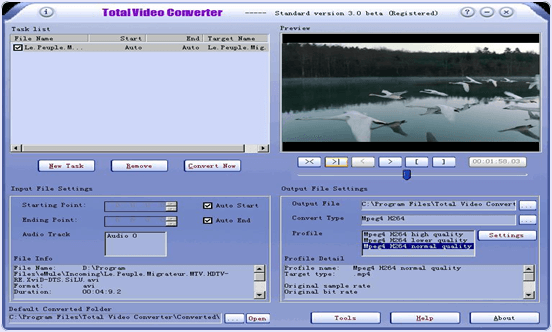
1. Total Video Converter.

Total Video converter is one of the best video converters. It is designed for Windows and Mac operating system. It is compatible with all version of Windows. We can convert file or a part of file from one format to another format. We can also play file before conversion. We can mark the starting and ending time of file before converting a clip of large file. We can also convert video files to audio files only. It also support various mobile format. It support various vedio formats including AVI, MOV, MKV, MP4, WMV, ASF, MPEG, MPEG-4, MPEG-2, TIF, AVC. Various mobile formats include Nokia, Sony, Blackberry, iPhone etc.
Download ButtonTotal Video Converter for windows pc

2. Handbrake.

Handbrake is one of the best video converter software which is freely available for you. It is designed for Windows, Mac and Linux. It support different formats including MP4, MKV, MPEG-4, MPEG-2. We can convert it into iPhone, iPad, iPod and another Android formats, 3GP and other mobile formats. We can also converts video to only audio with this converter.
Download ButtonHandbrake for windows pc

3. Format Factory.

Format factory is another free video converter software for you. It is compatible with Windows XP, 7, 8. It support MPG, MP4, MP3, BMP, TIF, WMA, FLV, 3GP and OGG video format. It is available in 65 different languages. It also support iPhone formats etc. It can also repair damage files. We can also convert a batch of files to another format. It also provide shut down option after completing the task.
Download ButtonFormat Factory for windows pc

4. Wondershare Video Converter.

Wondershare is another popular video converter software without any cost. It is compatible with all version of Windows. It s fastest video converter , its speed is 30 X faster than its competitors. It can be used to download videos from many other sites. It can convert AVI, MP4 MKV, MOV, FLV, 3GP , MPEG and many other formats. It also support all mobile formats. We can also play video and see the scenes from which we want to clip a small video clip and also select its end point in term of time.
Download ButtonWondershare Video Converter for windows pc

5. AVS Media Converter.

AVS Media Converter is free video converter tool which is currently available only for Windows. It is compatible with Windows XP, 7, 8. It support video format including AVI, VOB, AVCHD, Blu-Ray, MPEG, FLV, MKV. It also support mobile formats for blackberry, Sony, Apple, Android. We can also share our videos on web using this video converter. We can also set shut down after completion option for PC shut down after completion.
Download ButtonAVS Media Converter for windows pc

6. MPEG StreamClip.

MPEG StreamClip is also a free video converter software. It is compatible with Windows and Mac operating system. It support input format like MPEG, VOB, PS, AVI, MOV, DV, MMC, REC, VID and many others. It also support all mobile formats. We can also trim, clip and edit and transport videos using MPEG converter. We can also download videos from Google and YouTube by entering the link of video. We can also play videos in this converter.
Download ButtonMPEG StreamClip for windows pc
So these some best video converter software for windows PC. I hope you like all these listed software and find helpful for you. If you know any of the best video converter tool which is missing in above given list. You can share it with us in below given comments we will update it soon

How To Format Pendrive USB Using (3 Ways)

Devices Like PC, Laptop, Smartphones having huge amount of data stores. We store huge amount of data like images, audio, video files, games etc. All of the data is stored in hard disk or storage location. But all need any external device to transfer data from one location to another. So we use USB devices to transfer data from one device to another. Similarly SD cards are used in mobile. USB pendrives are typically removable and re-writable, and physically much smaller than an optical disc. USB flash drives are often used for the same purposes for which floppy, CD, DVD were used. I.e. for storage, data back-up and transfer of files. Pendrive are used to perform various function like we can create bootable pendrive for windows and even the device storage memory can be converted into ram memory like by using pendrive as ram.
Due to plugin pendrive on multiple devices. There are many chances for our pendrive get infected by some virus or malicious program. Even all these also slow down our pendrive. Recently we have discussed about increasing pendrive speed.  But when we are not able to access pendrive then formatting is only solution. But some viruses prevent the pendrive or sd card being formatting or Sometimes we remove them during read/write operation also result in file corruption. In that situation we need to format the drive. Their are many different procedure to perform format but if normal format feature is not performing then in this article we are going to discuss about best and possible different methods to format pendrive or SD card.

How To Format Pendrive Or SD Card


Method 1:- Format Pendrive Using cmd (Command Prompt)

1. Connect USB pendrive or SD card to your PC.
2. Click on Start > Search> Run > Type cmd and click on OK.
3. Assuming the letter assigned to the USB flash drive is H, type the following command:
a. format /q /x H: and press Enter.
b. The q parameter stands for quick format
c. The x parameter forces the selected volume to dismount, if needed.
For fat 32 type format /fs:fat32/q H:
command prompt cmd format fat32
For ntfs  type format /fs:ntfs/q H:
Note: Don’t forget to replace the letter “H“ with your drive letter.

Method 2:- Format using By Default Windows Option.

  • Plug your USB flash drive or memory card into the USB slot of your computer.
  • Normally your system should find it as a removable disk drive automatically.
  • Open “My Computer” and right click the removable disk drive you have just inserted.
  • Click “Format” on the menu that pops up.
  • format pendrive optionA dialogue box named “Format Removable Disk” should appear.
  • Select “FAT 32” under the File System and make sure Quick Format is not selected. (If you are not sure, just leave all the selections as default.)
  • Click the start Button.
  • A pop-up will inform you that the format action will erase all the data in the flash memory. Make sure you want to erase all data on the disk before you click OK. The formatting process will start once you click “OK”.
pendrive format windows

Method 3: USB Disk Storage Format Tool (For Windows only)

USB flash drives hold everything from personal and medical information to music and pictures and even secure data, with the added advantage of being small and rugged enough for keychain duty. USB flash drives provide option to format a pendrive when window was enable to format the USB drive due to some resource errors. USB Disk Storage Format Tool utility allows you to quickly and thoroughly format virtually any USB flash drive with your choice of FAT, FAT32, exFAT, or NTFS partition types.
download usb disk storage toolFEATURES:
  1. Quick format and safe format.
  2. Erase all data and delete space on flash drives that cannot be removed in the traditional way.
  3. Remove any tracks of malicious software that may have infected it.
  4. Correct partition errors if any.
  5. Create volume label for USB disk drives.
  6. Scan drive for errors before formatting.
  7. Create a FAT32 volume larger than 32 GB.
  8. Compatible with all version of windows

5 Best Free Dating Apps for Android and iOS Mobiles


Now a days everyone talking about online dating apps. I think it is one of the best way to meet your soulmate. Let’s find out which dating app is more closer to you. Here i am presenting one of the best online dating apps for android mobiles and IOS Mobiles. What you have to do is simple download these apps on your smartphone. Everyone has a curiosity to meet someone like who’s have same interests, habits and tastes. These dating apps are most famous in world wide. I can make sure that you will have great fun. It’s like adding another friend to your list. We never know what happens to us, so may be it will turn to marriage also. Just have a look here you will find out best dating apps.
Best dating apps

5 Best Online Dating Apps for Android and IOS Mobiles


Tinder

Tinder
Tinder is most popular dating website in the list. It’s available for both android and iOS users. Would you like to use this app on your mobile then what’s the late just simple download from google play store or Apple app store. Even it’s available freely. Basically tinder has been designed in very simple and easy way. It’s user interface is very friendly. There are millions of users are using this app on their mobile. The best thing about tinder is anyone can authenticated through Facebook, google+, twitter or using google account. Tinder gives you most interesting people around you.

Ok Cupid

Ok Cupid
Ok Cupid is world’s most famous dating website. It’s like real way to select better partner. You can get it for free on android and iPhone mobiles. Just it will take two minutes to sign in on their website. The best thing about this website is it available freely. You can find out right person for you. Ok Cupid made thousands of matches every day on their website.
Key Features of Ok Cupid
  • You can see who’s likes you
  • You may store more messages
  • You can change your username whenever you want
  • You may have enjoy advance search options and filters.
  • You may see if your message were read or not
  • It’s available freely

Coffee Meets Bagel

Coffee Meets Bagel
Coffee meets Bagel is private and free online dating app on earth. If you are looking for more love then this dating app is best. It’s available 100% free that’s why it’s highly rated dating app in the list. It can support both android and IOS mobiles. What you need to do is simple download on your smartphone. You can quickly review details and images on your matches. One of the easiest way to find out better soulmate. This app is now available in across all cities. Coffee meets bagel can share your mutual friends list also.

Bumble

bumble
Bumble is one of the best free online dating app in the world. Bumble is location based and social dating application. Which helps you to communicate between interesting users. You can find out someone know you are into them. You can browse and connect them near by your location. It can support both android and IOS mobile users. You can simple download from google play store or IOS app store on your smartphone. You can send and receive as many as messages freely. Bumble is fun and easy is to use on your mobile. There is a one rule in bumble that is woman has to say something first on 24*7 otherwise your connection will disappear. I think it’s worst thing about bumble.

Hitch

hitch
Hitch is new online dating app in the list. It allows you to plan matchmaker according to your interest. It’s a fun to meet new friend. This app available on android and IOS mobiles. Just feel free to download on your mobile. By using this app you can start meeting people today on wards. It has a very unique key features which helps to meet right person. You can review their profiles when ever you want to be. No one can message you on hitch unless you select to swipe on their profiles. Just try hitch and you will get to know why it is different from other dating websites.
These are best dating apps for android and IOS mobile. If you want to use these apps on your mobile you can simple download from google play store or IOS app store. I can promise that you will have a great time. Just have a fun and enjoy